
Table of Contents
Don't have the time to read the entire post? Our human writers will be sad, but we understand. Summarize the post with your preferred LLM here instead.
An authenticator app is a mobile app that generates short, time-based one-time passcodes you enter as a second step at login, on top of your password. The codes are created on your device from a shared secret set up when you link an account, refresh every 30 to 60 seconds, and are never sent over the network, so there’s nothing for an attacker to intercept.
As digital interactions grow and cyberattacks become more sophisticated, protecting customer accounts has never been more critical. Organizations are looking for security measures that strengthen defenses without driving users away. Authenticator apps have quickly become a go-to solution for this balance. They help businesses keep accounts secure, meet compliance expectations, and build trust, all while keeping login flows simple and familiar.
This guide examines the role of authenticator apps in a modern authentication strategy, how an authenticator works under the hood, the best options available today, and how they can facilitate secure and scalable customer experiences.
At a glance
An authenticator app is a mobile app that generates short, time based one time passcodes used as a second step when you log in, on top of your password.
The codes are created on your device from a shared secret set up when you link an account, and they refresh every 30 to 60 seconds, so there is nothing for an attacker to intercept over the network.
Popular authenticator apps include Google Authenticator, Microsoft Authenticator, Authy, Duo Mobile, and 1Password.
Authenticator app codes are more secure than one time codes sent over SMS, which can be intercepted or redirected through SIM swap attacks.
Setting one up takes a minute: install the app, open the security settings of the account you want to protect, and scan the QR code it shows you.
Quick facts
What an authenticator app is | A mobile app that generates time-based one-time passcodes (TOTP) as a second login factor. |
What it protects | Accounts and sensitive actions, even if a password has been stolen or guessed. |
How the codes are generated | Locally on the device, from a shared secret and the current time, using open standards like RFC 6238. |
How it compares to SMS | More secure: codes never travel over the network, so they can’t be intercepted or redirected through a SIM swap. |
Key outcome | Far fewer successful account takeovers, with minimal added friction for legitimate users. |
What is an authenticator app?
An authenticator app is a software-based tool that generates time-based one-time passwords (TOTP) to verify a user’s identity during login or sensitive actions. By adding this second layer of verification, organizations can make it significantly harder for attackers to gain unauthorized access even if usernames and passwords are compromised.
For organizations, authenticator apps deliver low-cost, high-impact security that integrates relatively easily with their identity and access management (IAM) flows.
Built on open standards like RFC 6238 (TOTP) and RFC 4226 (HOTP), they work smoothly across mobile and desktop devices, reducing friction for users and developers alike.
Popular examples of authenticator apps include Google Authenticator, Microsoft Authenticator, Authy, Duo Mobile, 1Password, and 2FAS.
How authenticator apps work
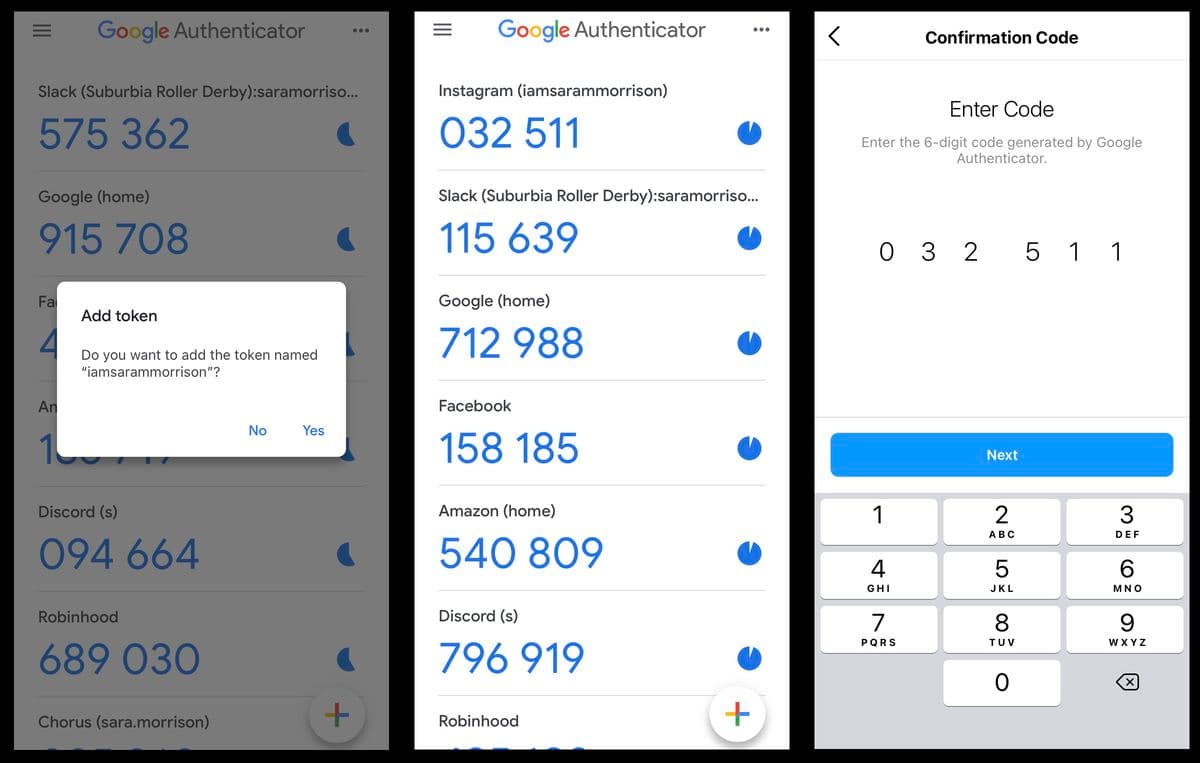
Authenticator apps rely on a shared secret—a unique cryptographic key—established between the app and your server during setup. Using this key and the current timestamp, the app generates a short TOTP, typically valid for 30 to 90 seconds.
When a user attempts to log in, they are prompted to enter the code displayed in the authenticator app. The server independently generates its own TOTP using the same shared secret and verifies that the two match. If they do, the authentication step succeeds.
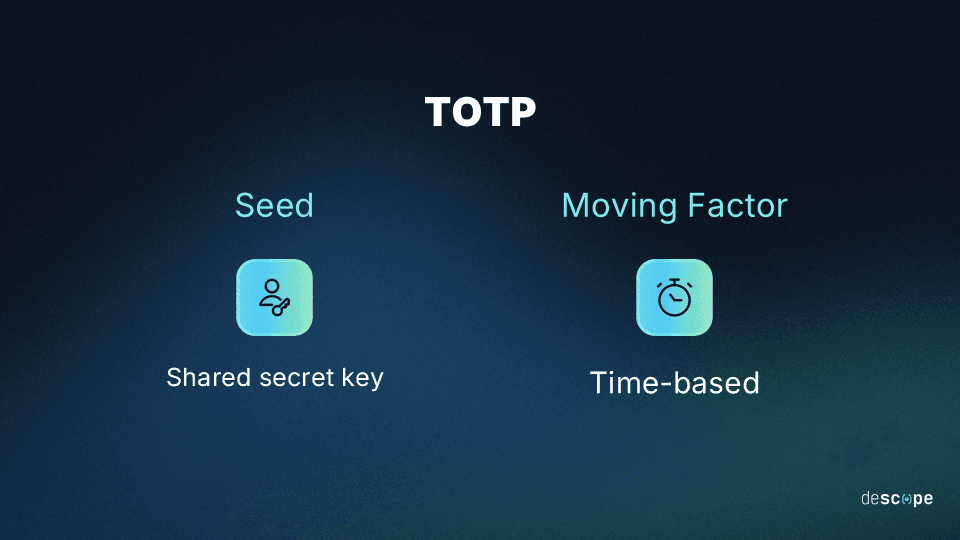
Here’s a step-by-step overview of how these apps work:
Setup: During initial setup, the user links their account with the authenticator app. This is typically done by scanning a QR code or manually entering a secret key provided by the service. This process securely establishes a shared secret between the app and the server.
Shared secret: The app securely stores this unique secret on the user’s device, while the server stores a matching reference. Each secret is unique to that specific user and account.
Code generation: Using the shared secret and the current timestamp, the app generates a short, numeric code (usually 6-8 digits) at fixed intervals, often every 30 seconds.
Code presentation: The app displays the active code to the user, refreshing it automatically with each time window to maintain uniqueness and security.
Verification: When the user logs in, they enter the current code displayed in their app.
Code validation: The server generates its own code using the same algorithm and shared secret.
Code matching: The server compares its generated code against the one the user submitted, and grants access only if they match.
Code expiration: Each code expires after its short validity period. For subsequent logins, a fresh code must be used.
Best authenticator apps for two-factor authentication
The apps below cover the most common needs, from simple personal use to enterprise workforce deployments. This is informational content to help readers pick a consumer app. Descope isn’t a consumer authenticator app itself; it’s the platform teams use to add authenticator app support to their own products, covered later in this guide.
App | Platforms | Cloud backup and multi-device | Best for | Cost |
|---|---|---|---|---|
Google Authenticator | iOS, Android | Optional backup to a Google Account, syncs across devices | Simplicity and broad familiarity | Free |
Microsoft Authenticator | iOS, Android | Cloud backup tied to a Microsoft account; also serves as a passkey provider | Microsoft and Entra accounts, push approvals | Free |
Authy | iOS, Android (desktop app discontinued in 2024) | Encrypted cloud backup protected by a separate backup password, syncs across mobile devices | Multi-device use with a stronger backup model than Google Authenticator | Free |
Duo Mobile | iOS, Android | Backup varies by organization policy; push-based approvals | Workforce and enterprise deployments | Free for individuals; organizations pay for Cisco Duo |
1Password | iOS, Android, Windows, macOS, Linux, browser extensions | Syncs through the user’s 1Password vault | Combining password management with built-in one-time codes | Paid subscription, no free tier |
2FAS | iOS, Android | Optional backup to iCloud or Google Drive, or manual file export | Open-source, privacy-focused use | Free |
A few things worth knowing beyond the table:
Authy’s desktop app was discontinued in 2024, so it’s mobile-only now.
Microsoft Authenticator’s password autofill feature was retired in 2025, in favor of Edge.
1Password has no free tier, it’s priced as part of a broader password manager subscription rather than sold as a dedicated authenticator.
Benefits of authenticator apps
Authenticator apps have become a popular choice for organizations securing customer accounts because they strike a balance between strong security and a familiar, low-friction experience. Here are some of the core benefits of authenticator apps:
Increases security
Authenticator apps make it far harder for attackers to exploit stolen credentials. Even if usernames and passwords are compromised, the account stays protected unless the attacker also has access to the device holding the shared secret. This significantly reduces the risks associated with phishing, credential stuffing, and account takeover attempts.
Works offline
Authenticator apps work even when users are offline, making them ideal for use in areas with poor internet connectivity or when travelling.
Improves user experience
Because authenticator apps generate codes locally on the user’s device, there’s no need for network coverage, text messages, or emails. This creates a smoother, more reliable authentication process that doesn’t frustrate users or add unnecessary friction.
Scales across platforms and devices
Based on open TOTP standards, authenticator apps work on both iOS and Android, and integrate easily with web, mobile, and API-driven applications. This makes it easy to deliver consistent multi-factor authentication (MFA) experiences to millions of users globally.
Drawbacks of authenticator apps
While authenticator apps provide significant benefits due to their passwordless nature, they also have some drawbacks. Here are a few to consider:
Device dependency
If a customer loses, resets, or upgrades their phone without transferring their authenticator app, they may be locked out of their account. Recovery can be complex and frustrating, increasing the likelihood of support tickets and negative user experiences.
Recovery processes can be cumbersome
Account recovery often requires identity verification steps that are perceived as intrusive or time-consuming by customers. This can lead to churn if users perceive the process as too difficult or slow compared to competitors offering simpler solutions.
Adds friction to login flows
Authenticator apps introduce extra steps in the login process. Customers need to open the app, find the right account, and manually enter a code within a short time window. This friction can lead to login abandonment, especially for users who value speed and convenience.
Still vulnerable to social engineering attacks
Although authenticator apps protect against stolen passwords, they don’t eliminate risks from social engineering. Bad actors can still trick customers into sharing their time-based codes, leading to account takeovers despite MFA being in place.
Should you add an authenticator app to your authentication flow?
If you're building a product rather than picking an app for personal use, the question shifts: should your login flow support authenticator apps as a second factor at all? They aren't the right fit for every user journey, but they deliver a strong balance of security and usability in specific industries, scenarios, and high-risk actions. Here are some situations where integrating an authenticator app makes sense:
Industries handling sensitive data
Financial services: Banks, investment platforms, and payment providers use authenticator apps to protect against account takeovers and fraud.
Healthcare: Patient portals and telehealth apps benefit from stronger MFA to safeguard sensitive medical records and maintain HIPAA compliance.
Enterprise SaaS: Platforms serving corporate users often require stronger MFA to secure proprietary data and maintain trust with business clients.
High-risk actions and transactions
Large financial transfers: Requiring a one-time code for wire transfers or large withdrawals adds a critical verification step.
Viewing sensitive customer data: Step-up authentication can prompt for additional security before displaying high-risk data like physical addresses and payment methods.
Password resets or account recovery: Using an authenticator app helps confirm user identity before modifying login credentials.
Device or location changes: If a user signs in from a new device, browser, or region, triggering an app-based code provides extra protection against unauthorized access.
Regulatory and compliance needs
Industries bound by security standards: Sectors like finance (PCI DSS), healthcare (HIPAA), and government services often integrate authenticator apps to meet regulatory requirements for strong customer authentication.
Users with higher risk profiles
Admins and privileged accounts: System admins, developers, or executives often get app-based MFA to protect sensitive systems and prevent breaches.
Customers with high-value accounts: Ecommerce platforms or marketplaces with significant stored value or loyalty balances often encourage these users to enable authenticator apps.
Add an authenticator app to your flow with Descope
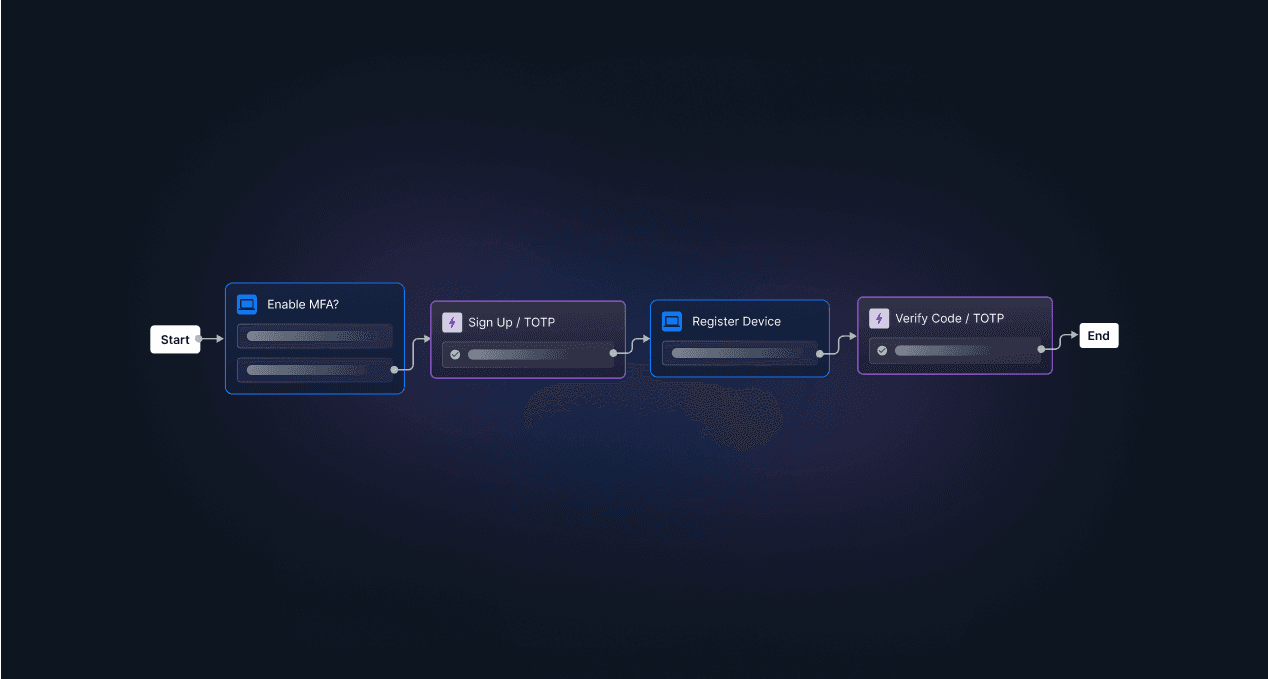
Descope isn’t a consumer authenticator app; it’s the platform teams use to add TOTP authentication to your app, along with passwordless and adaptive methods, through drag-and-drop workflows, SDKs, or APIs, no deep security expertise required. Our CIAM platform abstracts away the complexity of authentication while keeping it frictionless and secure, so your team can focus on building and scaling your core product.
Sign up for a Free Forever account, or book a demo to see how Descope can support your authentication strategy.